Skip to Content
ExamplesComplete SDK Example
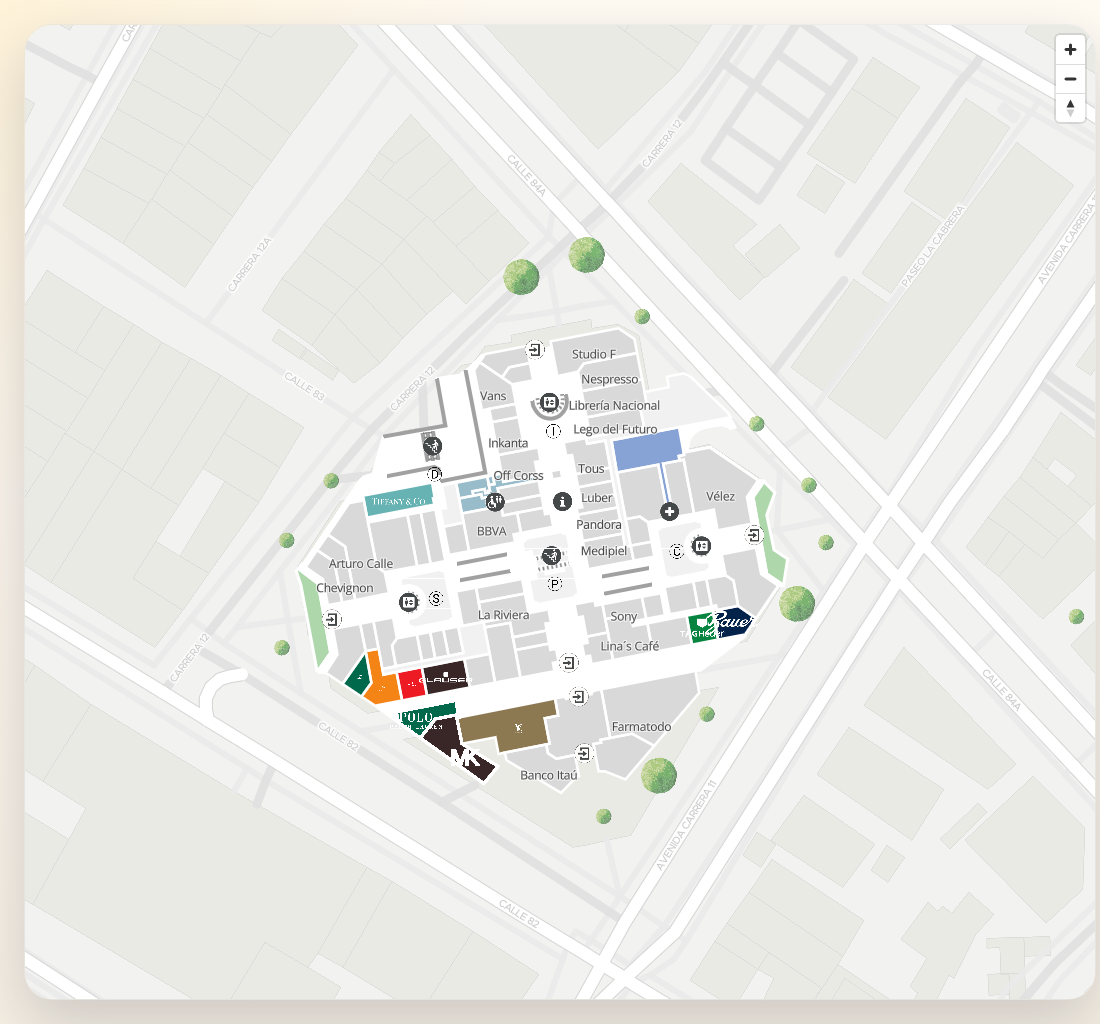
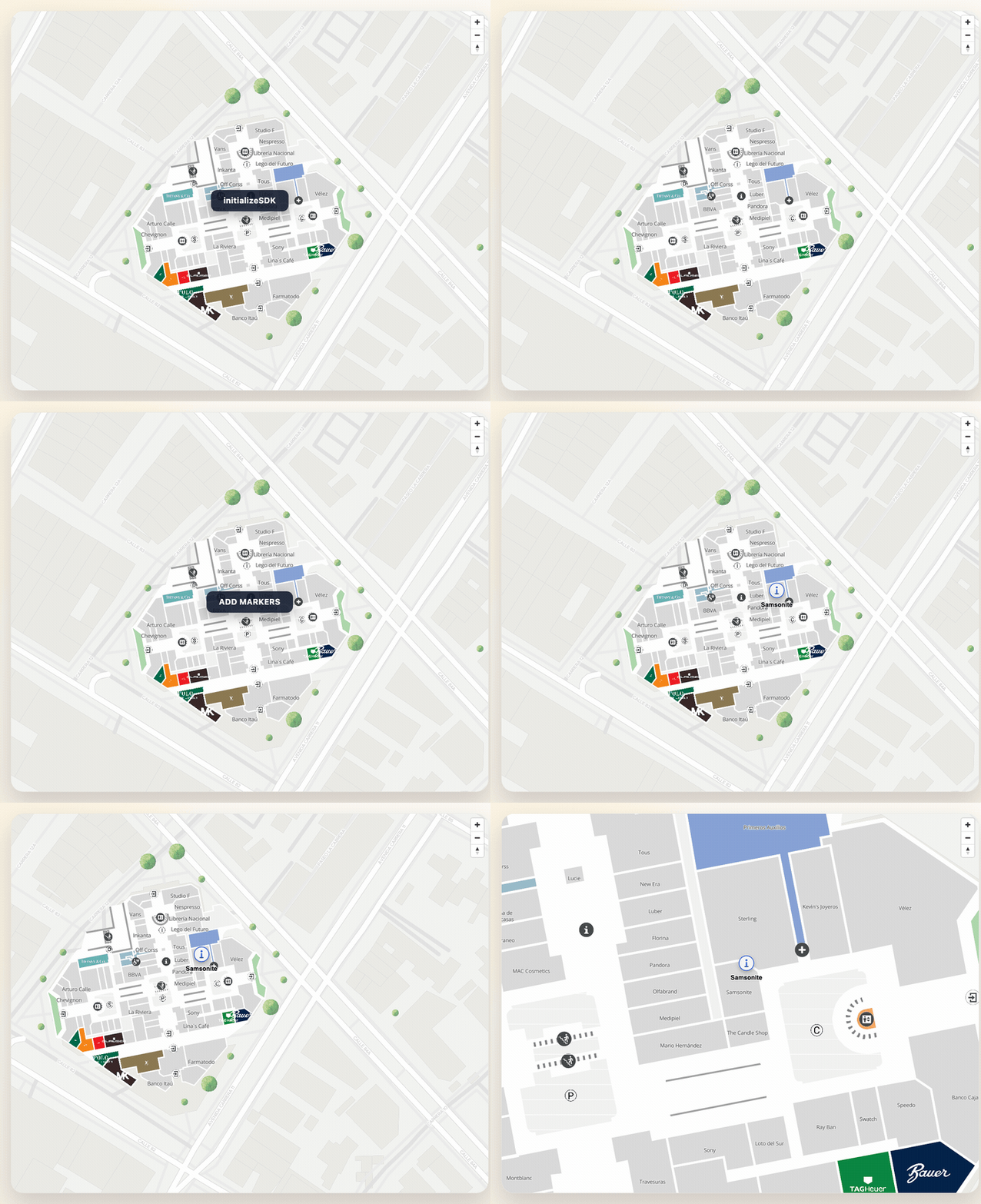
Complete SDK Example

This comprehensive example demonstrates all major features of the MapVX Web SDK, including:

  • SDK Initialization - Setting up the SDK with API credentials
  • Observable Map Ready State - Using promises to wait for map readiness
  • Map Creation Options - Creating maps with or without parent places
  • Map Configuration - Custom zoom, center, and event callbacks
  • Data Loading - Fetching available places and subplaces
  • Marker Management - Creating markers with custom icons and positioning
  • Map Navigation - Centering and fitting coordinates
  • Route Creation - Adding navigation routes between places
  • Event Handling - Responding to map interactions and state changes
  • Error Handling - Proper error management and recovery

Complete Example with Map Initialization and Markers

import { initializeSDK, loadStyles, type MapVXSDK, type MapVXMap } from "@mapvx/web-js" // Load default styles once at the beginning loadStyles() class MapExample { private sdk: MapVXSDK | null = null private map: MapVXMap | null = null private mapReady: boolean = false private mapReadyResolve?: () => void private mapReadyPromise: Promise<void> constructor() { // Initialize map ready observable pattern // This creates a Promise that will be resolved when the map is ready this.mapReadyPromise = new Promise<void>((resolve) => { this.mapReadyResolve = resolve }) } async initialize() { try { // 1. Initialize the SDK this.sdk = initializeSDK("your-api-key-here", { lang: "en" }) // 2. Create map with parent place (callbacks configured in mapConfig) await this.createMapWithParentPlace() // 3. Wait for map to be ready await this.waitForMapReady() // 4. Load data and create markers await this.loadDataAndCreateMarkers() } catch (error) { console.error("Error initializing:", error) } } // Option 1: Create map with specific parent place async createMapWithParentPlace() { const mapContainer = document.getElementById("mapContainer") as HTMLElement // Configure map with callbacks const mapConfig = { zoom: 15, center: { lat: 40.7128, lng: -74.006 }, onMapReady: () => { console.log("Map ready!") // IMPORTANT: Set internal state and resolve promise when map is loaded // This allows waitForMapReady() to work properly this.mapReady = true this.mapReadyResolve?.() }, onZoomEnd: (zoomLevel?: number) => { console.log(`Zoom changed to: ${zoomLevel}`) }, onFloorChange: (newFloorId: string) => { console.log(`Floor changed to: ${newFloorId}`) }, } this.map = this.sdk!.createMap(mapContainer, { ...mapConfig, parentPlaceId: "parent-place-id" }) } // Option 2: Create map without parent place (general configuration) async createMapWithoutParentPlace() { const mapContainer = document.getElementById("mapContainer") as HTMLElement const mapConfig = { zoom: 15, center: { lat: 40.7128, lng: -74.006 }, onMapReady: () => { console.log("Map ready!") // Set our internal state and resolve promise this.mapReady = true this.mapReadyResolve?.() }, } this.map = this.sdk!.createMap(mapContainer, mapConfig) } // Wait for map to be completely ready using observable pattern // This method returns a Promise that resolves when the map is fully loaded async waitForMapReady(): Promise<void> { // If map is already ready, resolve immediately if (this.mapReady) { return Promise.resolve() } // Otherwise, wait for the onMapReady callback to resolve the promise return this.mapReadyPromise } // Load places data async loadDataAndCreateMarkers() { try { // Option 1: Load available places const places = await this.sdk!.getAvailablePlaces() console.log("Available places:", places) // Option 2: Load subplaces from a parent place const subplaces = await this.sdk!.getSubPlaces("parent-place-id") console.log("Subplaces:", subplaces) // Create markers for first places if (places.length > 0) { await this.createMarkersForPlaces(places.slice(0, 3)) } } catch (error) { console.error("Error loading data:", error) } } // Create markers for a list of places async createMarkersForPlaces(places: any[]) { for (const place of places) { await this.createMarker(place) } } // Create an individual marker async createMarker(place: any) { try { const markerId = `marker-${place.mapvxId}` // Marker configuration const markerConfig = { id: markerId, coordinate: place.position, // { lat: number, lng: number } text: place.title || place.mapvxId, textPosition: "bottom", // "top" | "bottom" | "left" | "right" icon: "https://cdn-icons-png.flaticon.com/512/684/684908.png", // Icon URL iconProperties: { width: 40, height: 40, }, } // Add marker to map await this.map!.addMarker(markerConfig) console.log(`Marker created: ${markerId}`) } catch (error) { console.error("Error creating marker:", error) } } // Example of marker with different pin types async createMarkerWithCustomPin(place: any, pinType: "default" | "image" | "none") { const markerConfig = { id: `custom-marker-${place.mapvxId}`, coordinate: place.position, text: place.title, textPosition: "right", // Default SDK pin ...(pinType === "default" && { icon: undefined }), // Custom image pin ...(pinType === "image" && { icon: "https://cdn-icons-png.flaticon.com/512/684/684908.png", }), // Text only, no pin ...(pinType === "none" && { icon: null }), iconProperties: { width: 32, height: 32, }, } await this.map!.addMarker(markerConfig) } // Create route between two places async createRoute(fromPlace: any, toPlace: any) { try { const routeConfig = { initialLocation: { id: fromPlace.mapvxId }, finalLocation: { id: toPlace.mapvxId }, preferAccessibleRoute: false, language: "en", } const route = await this.map!.addRoute(routeConfig) console.log("Route created:", route) } catch (error) { console.error("Error creating route:", error) } } // Center map on a specific coordinate with optional zoom level // This method moves the map to focus on a particular location centerMapOnLocation(lat: number, lng: number, zoom: number = 15) { const camera = { center: { lat, lng }, zoom: zoom, } this.map!.updateCamera(camera) } // Fit map view to show all provided coordinates // Automatically calculates the best zoom and center to show all points fitMapToCoordinates(coordinates: Array<{ lat: number; lng: number }>) { if (coordinates.length === 0) return this.map!.fitCoordinates(coordinates, { padding: 50, // Add padding around the bounds maxZoom: 18, // Prevent zooming too close }) } // Advanced camera control with animation animateCameraToLocation(lat: number, lng: number, zoom: number = 15) { const camera = { center: { lat, lng }, zoom: zoom, duration: 2000, // 2 second animation essential: false, } this.map!.updateCamera(camera, () => { console.log("Camera animation completed") }) } // Advanced example: Bulk marker operations async createMultipleMarkersWithDifferentStyles() { const places = await this.sdk!.getAvailablePlaces() for (let i = 0; i < places.length && i < 5; i++) { const place = places[i] // Create marker with different styles based on index const markerConfig = { id: `bulk-marker-${i}`, coordinate: place.position, text: `${place.title} (${i + 1})`, textPosition: ["top", "right", "bottom", "left"][i % 4] as | "top" | "right" | "bottom" | "left", // Different icon for each marker icon: i % 2 === 0 ? "https://cdn-icons-png.flaticon.com/512/684/684908.png" : undefined, // Use default SDK pin iconProperties: { width: 30 + i * 5, // Varying sizes height: 30 + i * 5, }, } await this.map!.addMarker(markerConfig) } // Fit map to show all markers const coordinates = places.slice(0, 5).map((place) => place.position) this.fitMapToCoordinates(coordinates) } // Demonstrate map interaction features setupMapInteractions() { if (!this.map) return // Start listening for place clicks this.map.startClickListener((placeId: string) => { console.log(`Place clicked: ${placeId}`) // You could show a popup, highlight the place, etc. }) // Example: Add click handler that creates markers on clicked places this.map.startClickListener(async (placeId: string) => { const places = await this.sdk!.getAvailablePlaces() const clickedPlace = places.find((p) => p.mapvxId === placeId) if (clickedPlace) { await this.createMarker(clickedPlace) console.log(`Created marker for clicked place: ${clickedPlace.title}`) } }) } } // Usage example showing different initialization patterns const mapExample = new MapExample() // Pattern 1: Simple initialization document.addEventListener("DOMContentLoaded", () => { mapExample.initialize() }) // Pattern 2: With error handling and additional setup document.addEventListener("DOMContentLoaded", async () => { try { await mapExample.initialize() // Additional setup after map is ready await mapExample.waitForMapReady() // Setup interactions mapExample.setupMapInteractions() // Demo: Create multiple markers with different styles setTimeout(async () => { await mapExample.createMultipleMarkersWithDifferentStyles() }, 2000) } catch (error) { console.error("Failed to initialize map example:", error) // Show user-friendly error message const container = document.getElementById("mapContainer") if (container) { container.innerHTML = ` <div style=" display: flex; align-items: center; justify-content: center; height: 100%; color: #666; font-family: Arial, sans-serif; "> <div style="text-align: center;"> <h3>Map could not be loaded</h3> <p>Please check your API key and network connection.</p> </div> </div> ` } } })

Required Basic HTML

Option 1: With Manual CSS Loading

<!DOCTYPE html> <html lang="en"> <head> <meta charset="UTF-8" /> <meta name="viewport" content="width=device-width, initial-scale=1.0" /> <title>MapVX SDK - Complete Example</title> <!-- Load CSS manually --> <link rel="stylesheet" href="./node_modules/@mapvx/web-js/dist/umd/styles.css" /> </head> <body> <div id="mapContainer" style="width: 100%; height: 500px;"></div> <!-- Your compiled script --> <script src="your-compiled-script.js"></script> </body> </html>

Option 2: With Automatic CSS Loading

<!DOCTYPE html> <html lang="en"> <head> <meta charset="UTF-8" /> <meta name="viewport" content="width=device-width, initial-scale=1.0" /> <title>MapVX SDK - Complete Example</title> <!-- CSS will be loaded automatically by calling loadStyles() in your JavaScript --> </head> <body> <div id="mapContainer" style="width: 100%; height: 500px;"></div> <!-- Your compiled script that calls loadStyles() --> <script src="your-compiled-script.js"></script> </body> </html>

Useful Events and Callbacks

// Configure callbacks in MapConfig when creating the map const mapConfig = { zoom: 15, center: { lat: 40.7128, lng: -74.006 }, parentPlaceId: "your-parent-place-id", // Map ready callback onMapReady: () => { console.log("Map completely loaded and ready!") }, // Zoom change callback onZoomEnd: (zoomLevel?: number) => { console.log(`Zoom level changed to: ${zoomLevel}`) }, // Map rotation callback onRotate: (degrees: number) => { console.log(`Map rotated to: ${degrees} degrees`) }, // Floor change callback onFloorChange: (newFloorId: string) => { console.log(`Floor changed to: ${newFloorId}`) }, // Parent place change callback onParentPlaceChange: (newParentPlaceId: string) => { console.log(`Parent place changed to: ${newParentPlaceId}`) }, } // Create map with configured callbacks const map = sdk.createMap(mapContainer, { ...mapConfig, parentPlaceId: "parent-place-id" }) // Place click listener (configured after map creation) map.startClickListener((placeId: string) => { console.log(`Place clicked: ${placeId}`) }) // Stop listening to place clicks map.stopClickListener()

Error Handling

async function safeMapInitialization() { try { const sdk = initializeSDK("your-api-key", { lang: "en" }) const map = sdk.createMap(mapContainer, { parentPlaceId: "parent-place-id" }) return { sdk, map } } catch (error) { if (error.message.includes("API key")) { console.error("Invalid or missing API key") } else if (error.message.includes("network")) { console.error("Connection error") } else { console.error("Unknown error:", error) } throw error } }

Customization

The map configuration is loaded remotely by default, but you can override MapConfig to customize map options:

// Example: Override map configuration const customMapConfig = { zoom: 18, center: { lat: -33.4489, lng: -70.6693 }, parentPlaceId: "custom-parent-place", minZoom: 10, maxZoom: 22, pitch: 45, enableHover: true, showCompass: true, showZoom: true, navigationPosition: "top-right", bearingSnap: 15, lang: "en", onMapReady: () => { console.log("Custom map configuration loaded!") }, onZoomEnd: (zoomLevel) => { console.log("Zoom changed to:", zoomLevel) }, onRotate: (degrees) => { console.log("Map rotated to:", degrees, "degrees") }, onFloorChange: (floorId) => { console.log("Floor changed to:", floorId) }, onParentPlaceChange: (parentPlaceId) => { console.log("Parent place changed to:", parentPlaceId) }, } // Apply custom configuration when creating the map const map = sdk.createMap(mapContainer, customMapConfig)

Note: Configuration is fetched remotely, but can be overridden for specific customization needs. See the complete MapConfig interface documentation for all available options.

Key Features Demonstrated

🎯 Map Ready Observable Pattern

  • Custom Promise-based system to wait for map readiness
  • Prevents operations before map is fully loaded
  • Resolves immediately if map is already ready

🗺️ Flexible Map Creation

  • With Parent Place: Loads specific building/venue maps
  • Without Parent Place: General map configuration
  • Custom Configuration: Zoom, center, callbacks, and controls

📍 Advanced Marker Management

  • Custom Icons: URL-based or default SDK pins
  • Text Positioning: Top, bottom, left, right placement
  • Dynamic Sizing: Variable icon dimensions
  • Bulk Operations: Create multiple markers efficiently

📐 Camera Control & Navigation

  • Center on Location: Focus map on specific coordinates
  • Fit to Coordinates: Auto-zoom to show multiple points
  • Animated Transitions: Smooth camera movements
  • Bounds Management: Automatic padding and zoom limits

🔄 Interactive Features

  • Click Listeners: Respond to place selections
  • Event Callbacks: Map zoom, rotation, floor changes
  • Real-time Updates: Dynamic marker creation
  • Error Recovery: Graceful failure handling

Important Notes

  1. Automatic Dependencies: SDK includes all required libraries
  2. Async/Await Pattern: All operations are Promise-based
  3. Observable State: Use waitForMapReady() before map operations
  4. Event Configuration: Set callbacks in MapConfig during creation
  5. Error Handling: Always implement try/catch for network operations
  6. Performance: Use bulk operations for multiple markers
  7. Responsive Design: Map adapts to container size changes
Last updated on