Geolocation Override Implementation
This guide explains how to implement a custom geolocation override for the MapVX Web SDK.
Overview
The geolocation override allows you to replace the browser’s native Geolocation API with a custom implementation, enabling:
- Location simulation for testing
- Custom position management
- Integration with MapVX Web SDK’s location features
Implementation Steps
1. Create Custom Geolocation
An object able to programmatically obtain the position of the device. It gives Web content access to
the location of the device. This allows a Web site or app to offer customized results based on the
user’s location. Geolocationis defined as follow:
Web Reference
interface Geolocation {
  /** [MDN Reference](https://developer.mozilla.org/docs/Web/API/Geolocation/clearWatch) */
  clearWatch(watchId: number): void
  /** [MDN Reference](https://developer.mozilla.org/docs/Web/API/Geolocation/getCurrentPosition) */
  getCurrentPosition(
    successCallback: PositionCallback,
    errorCallback?: PositionErrorCallback | null,
    options?: PositionOptions
  ): void
  /** [MDN Reference](https://developer.mozilla.org/docs/Web/API/Geolocation/watchPosition) */
  watchPosition(
    successCallback: PositionCallback,
    errorCallback?: PositionErrorCallback | null,
    options?: PositionOptions
  ): number
}
You need to implement CustomGeolocation class that implements the Geolocation interface.
class CustomGeolocation implements Geolocation {
  private currentPosition: CustomGeolocationPosition
  private watchers: Map<number, (position: GeolocationPosition) => void> = new Map()
  private nextWatchId = 1

  constructor(initialPosition: CustomGeolocationPosition) {
    this.currentPosition = initialPosition
  }

  // Implement required Geolocation API methods
  getCurrentPosition(
    successCallback: (position: GeolocationPosition) => void,
    errorCallback?: (error: GeolocationPositionError) => void,
    options?: PositionOptions
  ): void {
    // Implementation
  }

  watchPosition(
    successCallback: (position: GeolocationPosition) => void,
    errorCallback?: (error: GeolocationPositionError) => void,
    options?: PositionOptions
  ): number {
    // Implementation
  }

  clearWatch(watchId: number): void {
    // Implementation
  }

  // Custom methods for position management
  setPosition(position: CustomGeolocationPosition): void {
    this.currentPosition = position
    this.notifyWatchers()
  }

  getStats() {
    return {
      currentPosition: this.currentPosition,
      watcherCount: this.watchers.size,
    }
  }
}
2. Create Geolocation Manager
As recomended by the MapVX SDK, create a manager to handle the custom geolocation. This manager will be responsible for setting the custom geolocation and managing the position. It will also provide methods to start and stop location tracking and update the position on map and sdk.
export class GeolocationManager {
  private sdk: MapVXSDK
  private map: MapVXMap
  private customGeolocation: CustomGeolocation

  constructor(sdk: MapVXSDK, map: MapVXMap) {
    this.sdk = sdk
    this.map = map
    this.customGeolocation = new CustomGeolocation(initialPosition)
  }

  // Methods for position management
  setCustomPosition(position: CustomGeolocationPosition): void {
    this.customGeolocation.setPosition(position)
    this.sdk.setGeoLocation(this.customGeolocation as Geolocation)
  }

  startLocationTracking(): void {
    this.sdk.setGeoLocation(this.customGeolocation as Geolocation)
    this.map.addUserLocationTracking(true, this.customGeolocation as Geolocation)
  }

  stopLocationTracking(): void {
    this.map.removeUserLocationTracking()
  }
}
Integration with MapVX Web SDK
SDK Integration
// Initialize SDK
const sdk = initializeSDK(apiKey, { lang: language })

// Create custom geolocation
const customGeolocation = new CustomGeolocation(initialPosition)

// Override default geolocation
sdk.setGeoLocation(customGeolocation as Geolocation)
Map Integration
// Create map
const map = sdk.createMap(container, options)

// Start location tracking with custom geolocation
map.addUserLocationTracking(true, customGeolocation as Geolocation)

// Stop tracking
map.removeUserLocationTracking()
Usage Examples
Basic Implementation
// 1. Create custom geolocation
const customGeolocation = new CustomGeolocation({
  coords: {
    latitude: 40.7128,
    longitude: -74.006,
    accuracy: 10,
    altitude: null,
    altitudeAccuracy: null,
    heading: null,
    speed: null,
    toJSON: () => {},
  },
  toJSON: () => {},
  timestamp: Date.now(),
})

// 2. Set in SDK
sdk.setGeoLocation(customGeolocation as Geolocation)

// 3. Use with map
map.addUserLocationTracking(true, customGeolocation as Geolocation)
Dynamic Position Updates
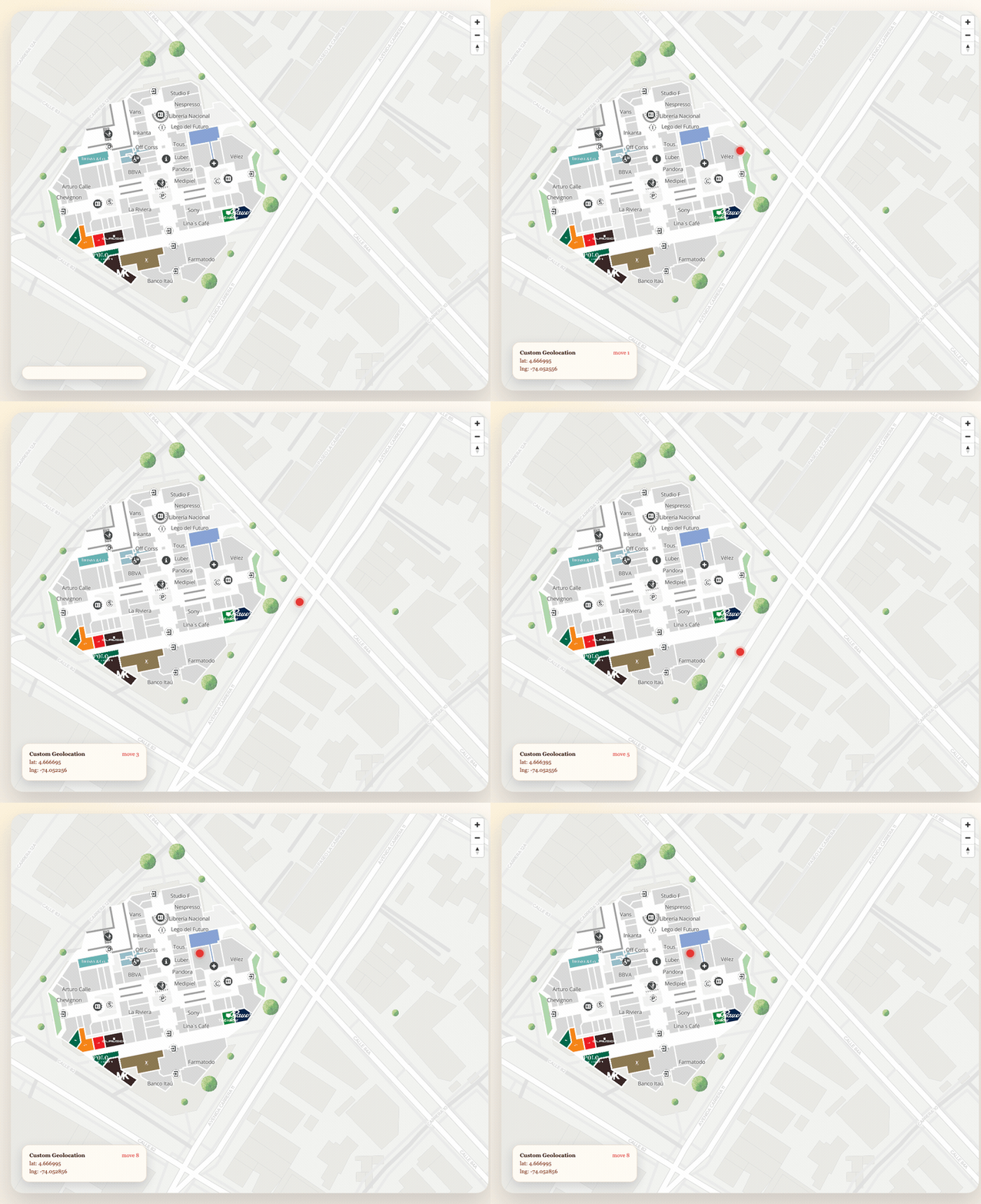
// Update position dynamically
customGeolocation.setPosition({
  coords: {
    latitude: 48.8566,
    longitude: 2.3522,
    accuracy: 10,
    altitude: null,
    altitudeAccuracy: null,
    heading: null,
    speed: null,
    toJSON: () => {},
  },
  toJSON: () => {},
  timestamp: Date.now(),
})
Position Watching
// Watch for position changes
const watchId = customGeolocation.watchPosition(
  (position) => {
    console.log("Position updated:", position.coords)
  },
  (error) => {
    console.error("Position error:", error)
  }
)

// Clear watch when done
customGeolocation.clearWatch(watchId)
Key Implementation Details
Geolocation API Compliance
The custom implementation must provide:
getCurrentPosition()- Get current positionwatchPosition()- Watch for position changesclearWatch()- Stop watching position
Position Object Structure
interface GeolocationPosition {
  coords: {
    latitude: number
    longitude: number
    accuracy: number
    altitude: number | null
    altitudeAccuracy: number | null
    heading: number | null
    speed: number | null
    toJSON(): object
  }
  timestamp: number
  toJSON(): object
}
Error Handling
interface GeolocationPositionError {
  code: number
  message: string
  PERMISSION_DENIED: number
  POSITION_UNAVAILABLE: number
  TIMEOUT: number
}
Best Practices
1. Error Handling
Always implement proper error handling for geolocation operations:
getCurrentPosition(
  (position) => {
    // Handle success
  },
  (error) => {
    // Handle error
    console.error("Geolocation error:", error.message)
  }
)
2. Position Validation
Validate position data before using:
setPosition(position: CustomGeolocationPosition): void {
  if (position.coords.latitude < -90 || position.coords.latitude > 90) {
    throw new Error('Invalid latitude')
  }
  if (position.coords.longitude < -180 || position.coords.longitude > 180) {
    throw new Error('Invalid longitude')
  }
  this.currentPosition = position
  this.notifyWatchers()
}
3. Memory Management
Clean up watchers when no longer needed:
destroy(): void {
  this.watchers.clear()
  this.nextWatchId = 1
}